System Requirements - TAPI driver

Contents
Telephone System
To communicate with a phone system, either a CTI server (Third Party Solution) or the connection of the phone set to the PC (First Party Solution) is supported. For both systems a TAPI driver 2.x (also referred to as TSP) is mandatory. See details for TAPI - Where do I find the TAPI driver?
•VOIP systems like Cisco Call Manager, Avaya, Swyx, Innovaphone or ESTECH normally have a TAPI driver included
•For Asterisk there are only a few vendors who offer a TAPI driver e.g. http://www.xtelsio.com.  Comments
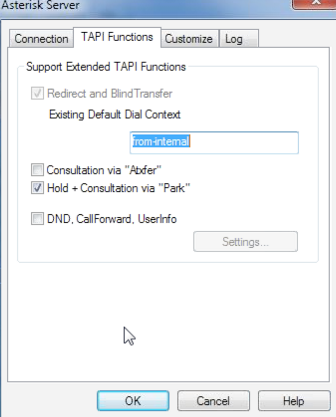
•You have to configure the following settings for xtelsio TAPI to get the hold and answer button working
|
•If your VOIP system does not come with a TAPI driver or you have a Cloud based PBX, try Global IP Telecommunications Ltd (Ninja Pro) www.globalipphones.com . This software works with all SIP compatible phone systems. You could also use a SNOM phone
•For some SNOM SIP phones you can find a TAPI driver at http://www.xtelsio.com (Xtelsio TAPI for Snom)
•Traditional PBX systems like Siemens or Alcatel often require an additional TAPI server. For Siemens you can use TAPI 120 up to 8 PCs or above this number TAPI 170 or other TAPI servers
•ISDN phones without a PBX are available with an inbuilt TAPI driver
•If you are using a modem, we strongly recommend switching to a phone set connected to the PC (via USB/serial), because the TAPI drivers of modems often do offer only basic functions or do not function at all
Please check firstly with your phone vendor about which solution meets your requirements and how you can install and configure the TAPI driver. You can contact Support@mirage-systems.de if you do have the TAPI driver installed and CTI Data Connector Enterprise Edition has problems with making an outgoing call or receiving incoming calls.
Operating System
•Windows XP (SP3), Vista, Windows 7. Windows 8 requires CTI Data Connector Enterprise Edition version 4.0.3 - all listed operating systems are supported in the 32 bit and 64 bit version. Windows 8 RT is not supported.
•.NET 3.5 is required for the salesforce call center adapter 4
Browser Support
The following list of browsers are supported by salesforce.com for the call center adapter 4.0.2:
Minimum system requirements
•Internet Explorer 8, 9 and 10 - 64 bit Windows operating system requires 64bit version of the IE. Internet Explorer 11 is not supported yet
•Firefox 3.5 +
•Chrome 10 +
•Safari 5+ (not officially supported)
While the adapter supports IE8 and Firefox 3.5 performance is significantly improved in browsers like
•IE10 (recommended Browser)
•Firefox >20
•Chrome >25
It is recommended that the call center adapter 4.0.2 is used with browsers in the above list.
 The limitations are due to the salesforce call center adapter 4.0.2. Check with the next salesforce release if new Browser versions are supported.
See Browser configuration about required configuration settings.
See also
Configure the TAPI driver within CTI Data Connector Enterprise Edition
Where do I find the TAPI driver?