Navigation: Part II - Enhanced Features > How TOs and FAQ >
How to create multiple keys for one product?


|
Navigation: Part II - Enhanced Features > How TOs and FAQ > How to create multiple keys for one product? |
|
Licence Protector allows to create multiple keys for one product of an order.
Situation A
Network licence and the quantity in the order is 5. By default one Activation Key with value = 5 ( user / PC / concurrent) is generated.
The value field is multiplied with the order quantity
|
Situation B
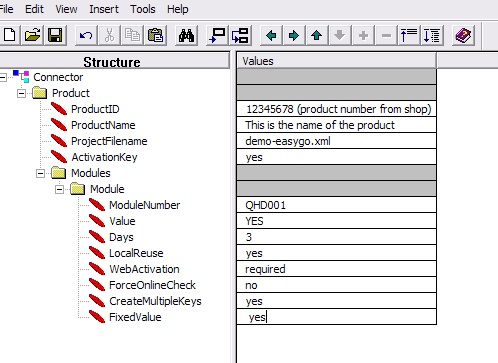
Single user licence and the quantity in the order is 5. You can specify with the parameter <CreateMultipleKeys> that five Activation Keys with value = 1 are generated.
The order quantity is used for the number of keys to generate. <FixedValue> has to be set to No (default value). If you have a Yes/No module then <FixedValue> is not necessary.
|