Navigation: Web Activation Server > Tutorial Web Activation Server > View and Modify > Web Service Requests >
Modify a Web Service Request


|
Navigation: Web Activation Server > Tutorial Web Activation Server > View and Modify > Web Service Requests > Modify a Web Service Request |
|
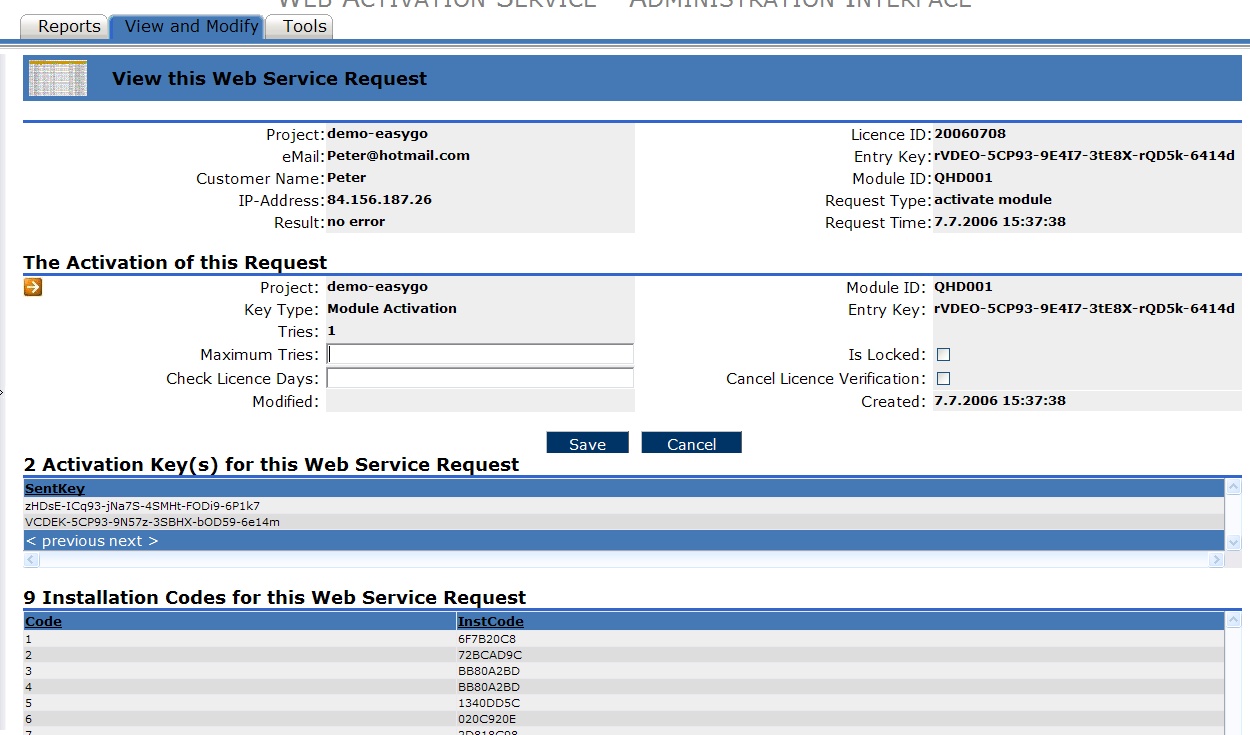
To modify a Web Service Request click on the View Link in the list view of Web Service Requests.
You find detail information like project name, licence file ID or IP-address in the header section.
You can modify:
| • | Maximum Tries – this defines how often a module or Activation Key can be activated. To allow one additional activation just add 1 to the number displayed in Tries (Tries = activations already done for this module / activation key) |
| • | Check Licence Days: set the interval in days for ongoing verifications, e.g. 20 days. This overrides the interval set in the licence file or defined in the licprotectorws.config file. The modification is applied after the next CheckLicence DLL call |
| • | Cancel Licence Verification – cancels the ongoing verifications after the next CheckLicence DLL call |
| • | Lock a licence – the licence is locked after the next CheckLicence DLL call |
Press the Save button to save the modifications.
Below this section, you find additional information:
| • | Activation Keys for this Web Service Requests – displays all Activation Keys which have been sent to the user machine |
| • | Installation Codes for this Web Service Request – all installation codes received from the user machine are listed here. The number of the installation codes depends on the version of the licprotector.dll |
The button  allows to view the corresponding activation entry of this request.