|
SetRegisterLanguages |

|

|

|

|
|
SetRegisterLanguages |
|
|
|
|
If the user should be able to select a language via a drop down list, you can specify the languages which should be available. Multiple languages can be combined.
Value 10000;20000;70000 would allow to select German, English and Dutch.
If case the user changed the language, the new value can be retrieved with GetLanguage.
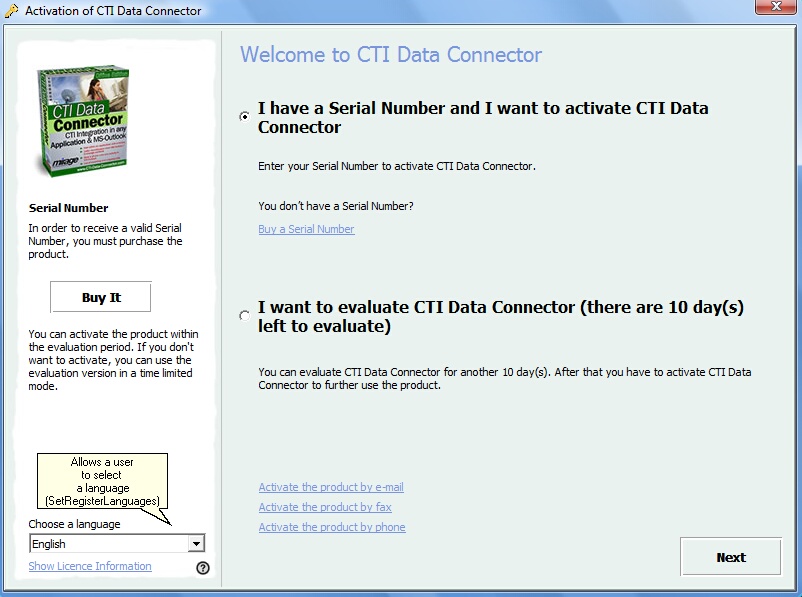 |
| Sample Screen using SetRegisterLanguages |
Name |
SetRegisterLanguages |
||||||||
Purpose |
Sets all possible languages for the EasyGo page (PrepareAndCheck) |
||||||||
Params |
|
||||||||
Returncode |
|
||||||||
Usage |
SetRegisterLanguages should be used to set those languages that should be visible on the EasyGo page for PrepareAndCheck. The user is able to select on of these languages for the Activation procedure. |
||||||||
Sample |
lic.SetRegisterLanguages(‘en;de;es’); …
|
||||||||
See also |
GetLanguage, SetRegisterSettings, PrepareAndCheck (EasyGo) |
Page url: http://www.helpserver.biz/onlinehelp/lp/easygo/2.7/help2000/index.html?fr_setregisterlanguages.htm


