

Activation Key - Tamper Detection |

|

|

|
||
|
Activation Key - Tamper Detection |
|
|

|

|
Activation Key - Tamper Detection
|
Activation Key - Tamper Detection |
|
|
|
||
|
Activation Key - Tamper Detection |
|
|
|
|
Activation Key for Tamper Detection
To retrospectively activate, deactivate or change the Tamper Detection scheme, a special Activation Key is used. Select Edit, Activation Key for Tamper Detection. You find a complete documentation of these features within the developer documentation.
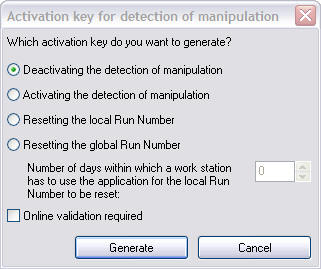
Select desired Option and press Button Generate
| • | Switch off Tamper Detection - deactivates the Tamper Detection - also see Additional Settings Page |
| • | Switch on Tamper Detection - activates the Tamper Detection |
| • | Reset local Run Number - should be used with single user installations to unlock the system after a Tamper Detection |
| • | Reset global Run Number - should be used with multi user installations to unlock the system after a Tamper Detection. As every PC has to be unlocked, the period of time has to be specified within which each PC has to start the application |
| • | Online validation required - transfers this key to the Web Activation Server to ensure that it can not be used twice |