Use DLL without registering

Contents
You can install the Licence Protector DLL (not COM exe) without registering it. The DLL is loaded during runtime. This allows an installation process which does not require administration rights.
You need a manifest file with the same name as the EXE file - e.g if the application file name is demo-easygo.exe the manifest filename must be demo-easygo.exe.manifest. Find below a sample manifest file for the License Tester which can also be downloaded here (sample is for version 410).
You have to change
<?xml version="1.0" encoding="UTF-8" standalone="yes"?> <assembly xmlns="urn:schemas-microsoft-com:asm.v1" manifestVersion="1.0">
<assemblyIdentity name="licence-tester.exe" version="3.1.0.261" type="win32" processorArchitecture="x86"/> <file name="LicProtector410.dll" hashalg="SHA1"> <comClass clsid="{91D35F95-60F6-446C-9433-3BEFAE85640B}" description="LicProtector Object" tlbid="{BEEFFA1A-D2C9-4875-9B7B-2FE406E7A19C}" threadingModel="apartment" progid="LicProtector.LicProtectorDLL410"/> <typelib tlbid="{BEEFFA1A-D2C9-4875-9B7B-2FE406E7A19C}" version="4.0" helpdir="" flags="hasdiskimage"/> </file>
</assembly>
Some development tools like C++ compile a manifest file in the EXE file. Windows XP uses the external manifest file but Windows 2003, Vista or Windows 8 would use this internal manifest file and ignore the external manifest file. You can edit the internal manifest file in the source code and change it (recommended) or remove the internal manifest file. Removing the file could cause problems, e.g. missing skinning support.
|

 .NET - use DLL without registering
Visual Studio allows an installation without registering the DLL. The flag Isolated must be set to true.
Article about the isolated COM |
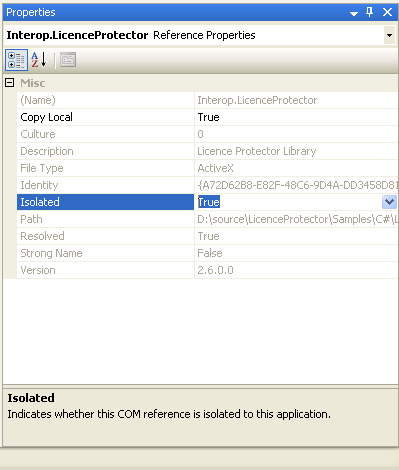
To use the DLL without registering, you have to build a standalone EXE file and the manifest file like described above.
Using .JAR files are not supported. They need to register the DLL. |
See also article regarding supported operating systems
http://msdn.microsoft.com/en-us/library/f8h7012w.aspx
Tool to create manifest files and background information
http://www.mazecomputer.com/index.htm

There is another option to use the DLL without administrator rights by using LPregister410.exe