Navigation: Part II - Enhanced Features > Web Activation Server >
Activation Server for Testing


|
Navigation: Part II - Enhanced Features > Web Activation Server > Activation Server for Testing |
|
We provide a Test Activation Server, which allows you to make real activations with your product before you order the hosting service.
Use the following configuration settings.
| • | In the Screen - Settings, set the URL to Web Activation Server to http://registerserver.net/9999999/lpweb/lpws.asmx |
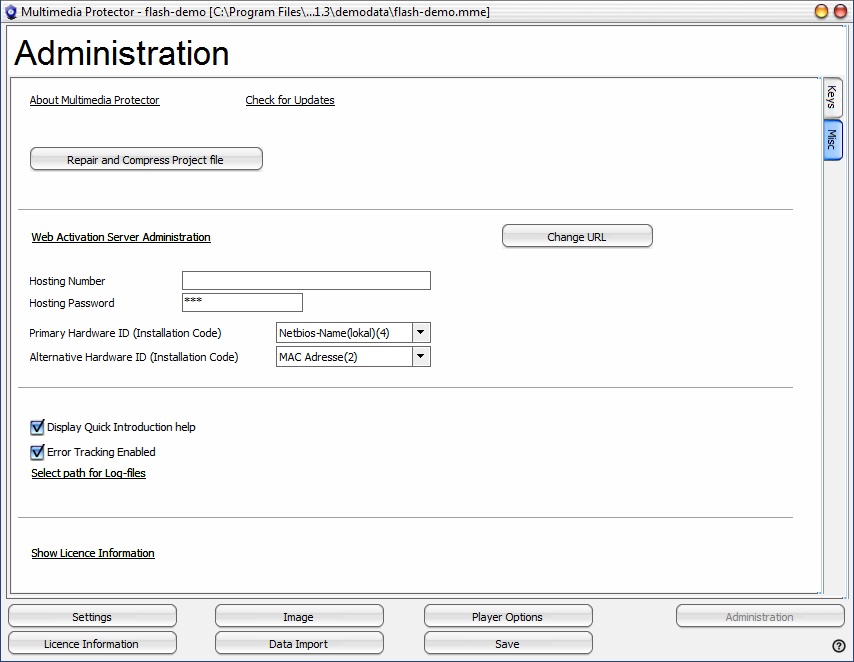
| • | In the Screen - Administration, Set Hosting Number to 9999999 and Password to lp9999999 |
| • | In the Screen - Administration. press the button Change URL and type in the URL to the Webserver, http://www.registerserver.net/9999999/lpweb |
 |
| Configure Activation Server |
| • | Upload configuration files to Activation Server |
| • | Log into Web Administration Interface using the Link in the Web Activation Server Administration |
| • | Select menu Tools, select: Restart Webservice |
Now you can start using a Serial Number and activate the product online.
Retrieve Statistics
| • | Log into Web Administration Interface using the Link in the Web Activation Server Administration |
| • | Browse the tutorial of the Web Activation Server |
 As this is a testing environment the projects are removed from time to time and the activations are deleted.