Navigation: Part II - Enhanced Features > File Conversion / Supported File Types > Files needed Conversion > PowerPoint (PPT) >
Use PowerPoint Viewer


|
Navigation: Part II - Enhanced Features > File Conversion / Supported File Types > Files needed Conversion > PowerPoint (PPT) > Use PowerPoint Viewer |
|
By default, PowerPoint Viewer is installed when you install PowerPoint, so that you can use the Viewer with the Package a Presentation for CD feature. Otherwise you can download the Viewer from the Microsoft Website. Just search in the Online help of PowerPoint how to download the Viewer.
There are 3 steps to protect the PowerPoint presentation.
Create a Presentation for CD
The following description refers to PowerPoint 2007 but the required steps should be similar for other PowerPoint versions.
| • | On the Microsoft Office Button, point to the arrow next to Publish, and then click Package for CD |
| • | In the Package for CD dialog box, in the Name the CD box, type a name for the CD presentation |
| • | Click Options. Under Package type, you must select: Viewer Package (update file formats to run in PowerPoint Viewer), and then select an option in how presentations will play in the viewer list |
| • | To ensure that files that are linked to your presentation are included in the package, select the Linked files check box |
| • | Click OK to close the Options dialog box |
| • | Click Copy to Folder, enter a folder name and location, and then click OK. |
 Create a new folder where you only store the files for this project
Copy the start application
To run with Multimedia Protector, a special start application is needed. Copy the file startppt.exe from the Multimedia Protector installation folder ...\tools\ppt to your project folder where you saved the CD presentation
The folder contains now all files which come with the PPT Viewer, the startppt.exe and your PPT presentation files.
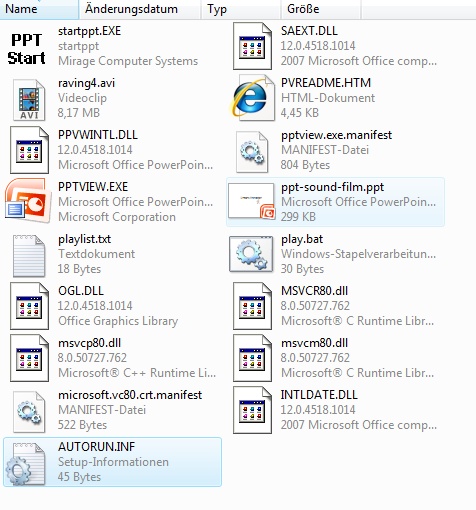 |
| Directory with PPT Viewer and other files to import |
Import the files
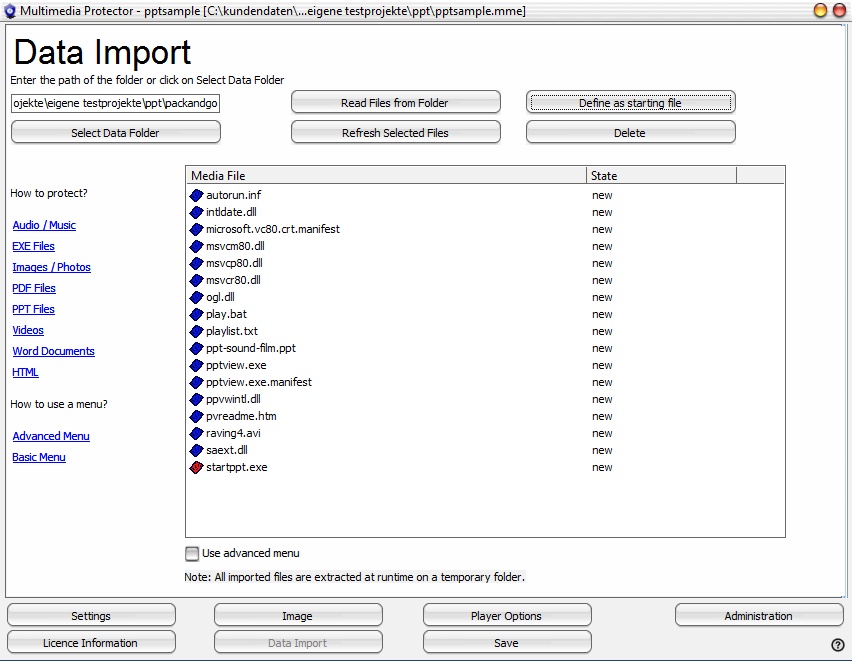
Now import all the files from the project folder you created and mark startppt.exe as startfile using the button Define as starting file. A red icon signals the start file.
The import screen would show the following files if you are using PowerPoint 2007.
Page url: http://www.helpserver.biz/onlinehelp/lpmme/1.3/generator/help2000/index.html?ppt_use_ppt_viewer.htm