Navigation: Part II - Enhanced Features > Activation and Registration Screens >
Licence Viewer


|
Navigation: Part II - Enhanced Features > Activation and Registration Screens > Licence Viewer |
|
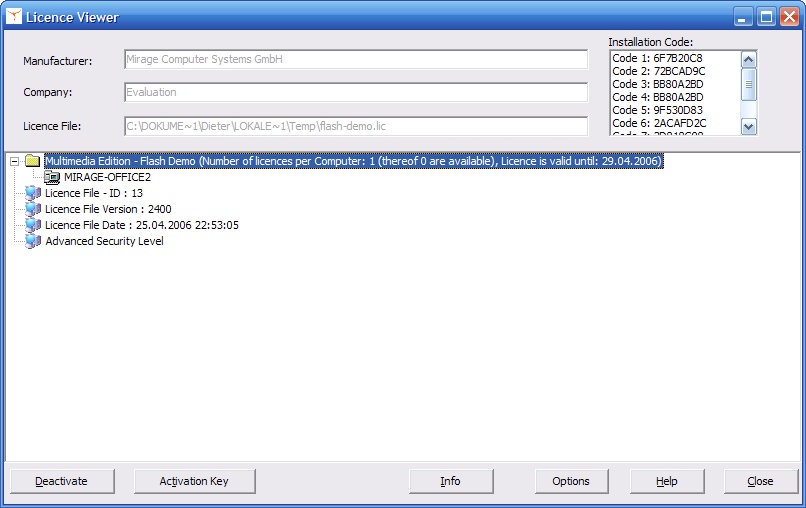
The Licence Viewer is the built-in administration tool which can be accessed from any screen during the activation and registration process with the link Show Licence Information. The Licence Viewer can also be invoked by starting the Multimedia Player with the parameter -v
Sample: flash-demo -v
It displays:
| • | Manufacturer. The Company Name defined in the screen - Settings |
| • | Company: Before applying the Serial Number the Default Customer Name. After that, the customer name entered during the activation (Online, E-Mail, Fax, Phone) |
| • | The product name defined in the screen - Settings |
| • | The license type (per user / PC / concurrent) defined in the screen - Licence Information, maximum number of licenses and available licenses. Also the name of the users or the PC name using a license |
| • | The remaining time for evaluation (expiry date) as defined in the screen - Licence Information |
| • | The installation codes (hardware IDs) |
The user can:
| • | Deactivate a license by selecting the user name or PC name, if the license is not longer needed - see also error message No free license available |
| • | Enter an Activation Key which was generated within the screen Administration, e.g. to change the time limitation or number of users / PCs |
| • | Activate a log file with the Options button, in case Mirage Support needs to trace an error |