|
CDMenuPro |


|

|

|

|
|
CDMenuPro |
|
|
|
|
This application can be downloaded at: http://www.cdmenupro.de/
This menu application creates an EXE file. This file is on the CD or in the download link and it is not protected (don't import it in the Multimedia Protector database).
You have to copy all Multimedia Protector files from the folder Deploy into the folder CD_ROOT of the CDMenuPro project.
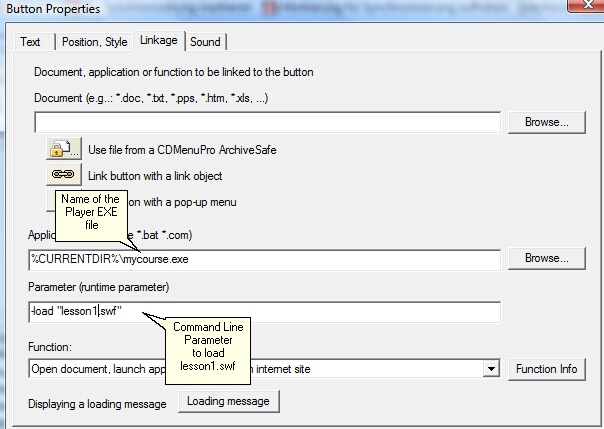
After defining buttons to invoke e.g. lesson 1, lesson 2 you specify in the properties dialog of a button the command, to invoke the invoke the Multimedia Player.exe file.
In the line Application add the path and the name of the Multimedia Player.exe file. In the line Parameter add the command to load a flash file or PDF file. See chapter Start a specific file inside the database to get all details for this command.
In the screenshot below, the file (Player) mycourse.exe is started and loads the file lesson1.swf.
The sample below starts the player with a different database. This feature can be used if you split the project into several databases.
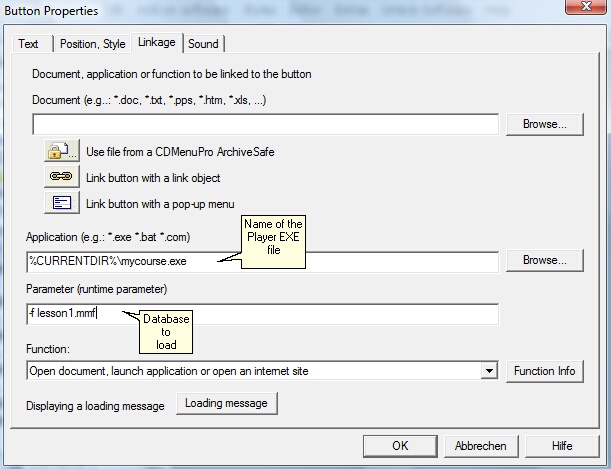
 If you don't specify a runtime parameter, the main database (same name like the Multimedia Player) is started and the file, which is defined as start file, is loaded.
List of all start options for the player
See also
Start a specific file inside the database
Split project into several databases
All command line options
Additional Menus
Page url: http://www.helpserver.biz/onlinehelp/lpmme/2.1/generator/help2000/index.html?cdmenupro.htm

