|
EXE configuration options |


|

|

|

|
|
EXE configuration options |
|
|
|
|
There are different options you can use, depending on the type of your application.
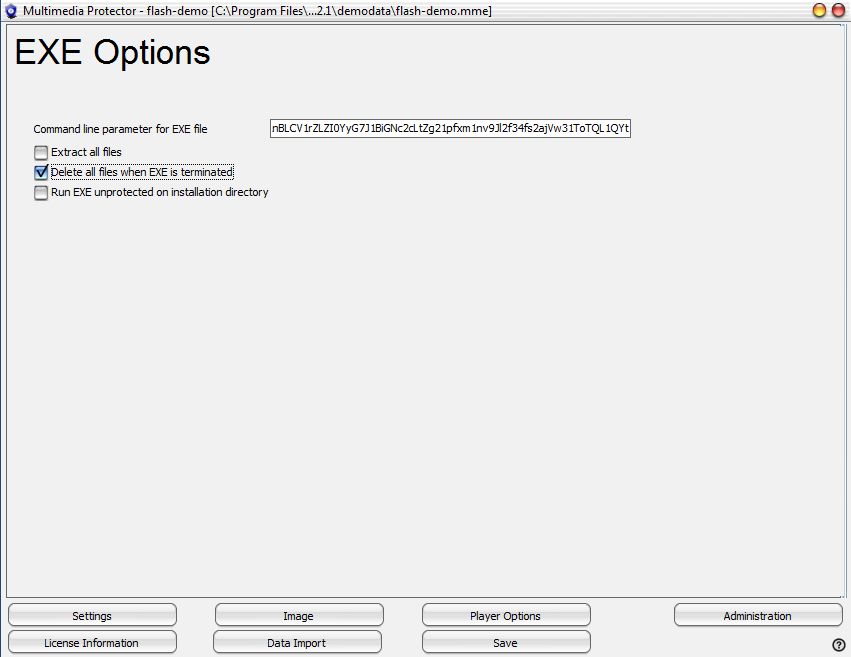
 | Command Line Parameter for EXE file (password for EXE file) |
The protection can be improved significantly by providing a password as a command line parameter. This option should be used if source code is available. If you do not have a source code, you could use an EXE packer to add the password.
The password may not contain spaces and the character "
When a EXE file is specified as a start file, a new option is visible: Command line parameter for EXE file
The Multimedia Player provides the password during runtime when the EXE file is invoked.
We recommend splitting the password in different parts and variables of the application to prevent, that a hacker can find out the command line by analyzing the EXE file.
Sample
A very simple method would be to hide the strings in different program parts and make calculations. You can implement more sophistic code like the one below. This is just to outline an idea.
x$=”2” a$=r1nBLCV1rZLZI0YyG7J1BiGNc2cLtZg+str$((val(x$)+1)*7)pfxm1nv9Jl+x$ c$=f34fs+x$+ajVw31ToTQL1QYt
commandparameter$=a$+b$+c$
|
This option extracts the EXE file AND all other files in the database to a temporary folder. Import only additional files if they should be protected (e.g. if you use the PowerPoint Viewer you also have to import the PPT files). During runtime, the additional files are not protected. |
This option deletes all files on the temporary folder after the EXE file is terminated. Only uncheck this option if the main EXE file invokes other EXE files. If the application is one EXE file then always check this option.
|
This option would extract the EXE file to the folder, where the Multimedia Player is located. You could use this option if you have no source code and the EXE file must be on the same folder like the other files. You could additional use a file encryption tool. |


