|
Licence Type |


|

|

|

|
|
Licence Type |
|
|
|
|
For information about licensing see available license options.
Select one of the 3 possible license types. Licence per:
| • | PC |
| • | User / Person |
| • | Concurrent user |
Non-network license
If the application is a non-network application (installation on a single PC), choose license per PC and number of PCs = 1. This is the only option in the Standard version. For details about the user license see Licence per PC.
Non-network license / single user installation
If the application is a non-network application (installation on a single PC) AND you want to limit it to one user, choose license per User and number of users = 1. For details about the user license see Licence per User / Person.
Network license
Select one of the 3 possible license types and the number of users/PCs you want to allow during evaluation. See also How to distribute a network version.
 The network license and license per User as well as Concurrent User is available only in the Multimedia Protector Premium Edition.
 The number of users or PCs for the full version can be changed with an Activation Key.
For network installations, the number of users / PCs has to be set to 99999 if no limitation is required.
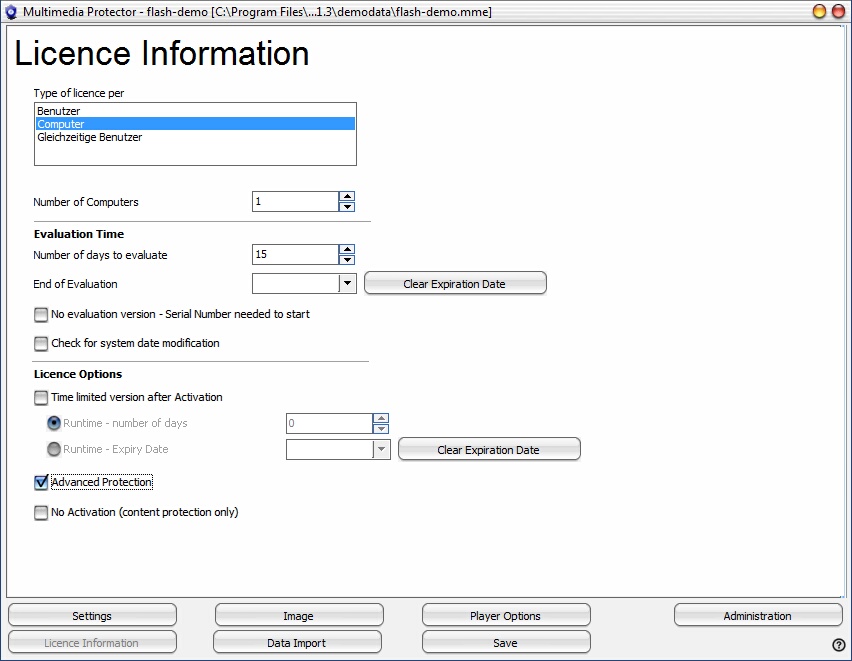 |
| Screen - Licence Information |
If a user connects through a remote connection using a tool like Remote Desktop, Citrix, Terminal Server or gotomypc, it depends on the tool if the remote connection counts as a separate license. For most tools, Multimedia Protector retrieves the PC name of the remote PC and counts the connection as a new license.
Concurrent user is not supported when the main application is an EXE file.
This feature is available only in the Multimedia Protector Premium Edition.
Page url: http://www.helpserver.biz/onlinehelp/lpmme/2.1/generator/help2000/index.html?license_type.htm

