|
No Source Code / Encrypt EXE |


|

|

|

|
|
No Source Code / Encrypt EXE |
|
|
|
|
If you don't have a Source Code and you want to add a password or you additionally want to encrypt the EXE file (e.g. .NET applications), then you could use the EXE packer - RLPACK - http://rlpack.jezgra.net/
It encrypts the EXE file and allows to specify a password, which is passed from Multimedia Player to the encrypted EXE file. You need at least version 1.2.1 of RLPACK. The password feature is only available in the full version.
Before you buy the software, first check with the free trial version, if the product encrypts your EXE file and the file starts correct.
Step 1 - Encrypt File and add Password
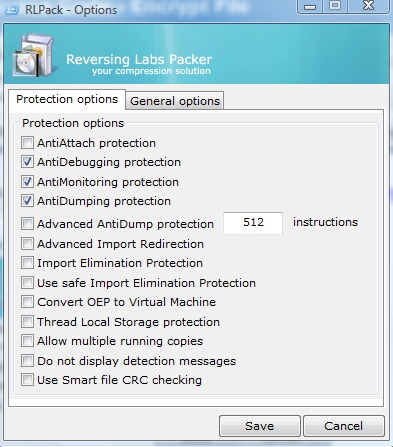
Encrypt your EXE file and add a password. Find below settings, which should work for most applications but you have to test it thoroughly with your application.
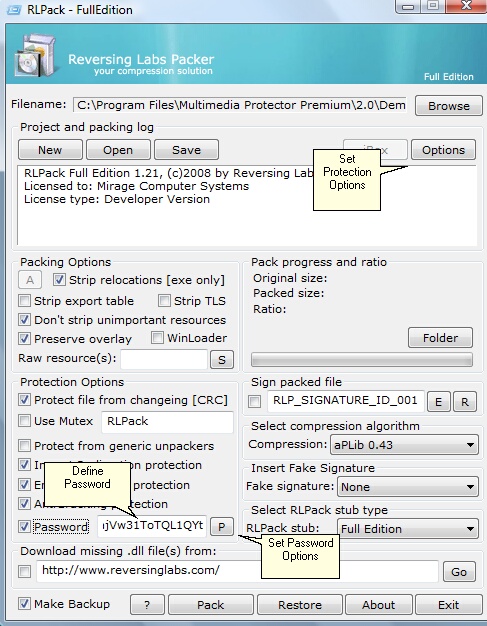
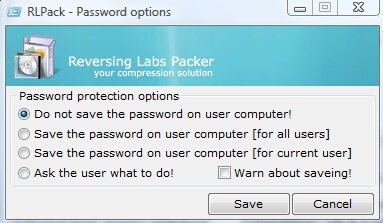
Define a password as recommended in the chapter - define password for EXE file. Click on the P button to specify password options. Select: Do not save the password on user computer!
Click on the options button an define Protection options.
Step 2 - Import the EXE File
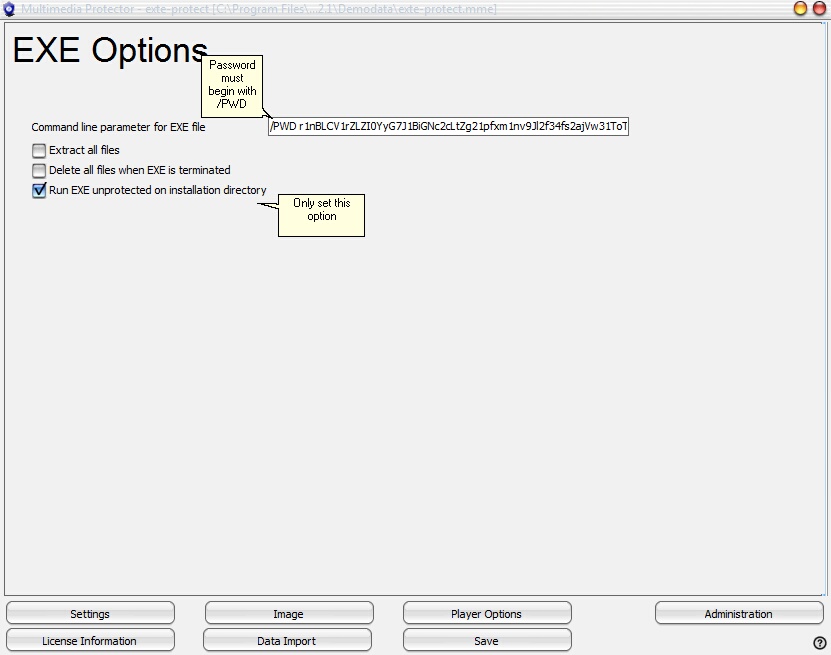
Import the EXE file and specify a command line parameter. The command line parameter for RLPack needs a special format - It must begin with /PWD followed by the password.
If your application depends on other files and you do not have the Source Code, then select: Run EXE unprotected on installation directory and uncheck all the other options. This will extract the file to the installation folder and find all the other files as expected.
 The name of the Multimedia Player (project name) must be different like the EXE name you protect as the EXE is extracted to the main folder during runtime.
MIRAGE MAKES NO REPRESENTATION, WARRANTY, OR GUARANTY AS TO THE RELIABILITY, TIMELINESS, QUALITY, SUITABILITY, TRUTH, AVAILABILITY, ACCURACY OR COMPLETENESS OF THE SOFTWARE MENTIONED IN THIS TUTORIAL. MIRAGE DOES NOT REPRESENT OR WARRANT THAT (A) THE USE OF THE SOFTWARE WILL BE SECURE, TIMELY, UNINTERRUPTED OR ERROR-FREE OR OPERATE IN COMBINATION WITH ANY OTHER HARDWARE, SOFTWARE, SYSTEM OR DATA, (B) THE SOFTWARE WILL MEET YOUR REQUIREMENTS OR EXPECTATIONS, (C) ERRORS OR DEFECTS WILL BE CORRECTED, OR (D) THE SOFTWARE IS FREE OF VIRUSES OR OTHER HARMFUL COMPONENTS.
THE SOFTWARE IS PROVIDED TO YOU STRICTLY ON AN "AS IS" BASIS. ALL CONDITIONS, REPRESENTATIONS AND WARRANTIES, WHETHER EXPRESS, IMPLIED, STATUTORY OR OTHERWISE, INCLUDING, WITHOUT LIMITATION, ANY IMPLIED WARRANTY OF MERCHANTABILITY, FITNESS FOR A PARTICULAR PURPOSE, OR NON-INFRINGEMENT OF THIRD PARTY RIGHTS, ARE HEREBY DISCLAIMED TO THE MAXIMUM EXTENT PERMITTED BY APPLICABLE LAW BY MIRAGE.

