|
Split project into several databases |


|

|

|

|
|
Split project into several databases |
|
|
|
|
Splitting a project into multiple databases (mmf files) is recommended, if the project includes EXE files and the database size would be more than 80 to 100 MB.
Unlike flash files, where each file is only loaded when needed, EXE files and all the other files in the database are loaded during program start. If the database is too big, the program start takes too much time.
The following steps are necessary to built a project, which is split in sub projects (databases).
Copy / duplicate the main project
First create a main project and define the main start file of the application. Then copy the project (in the main menu select: Copy Project):
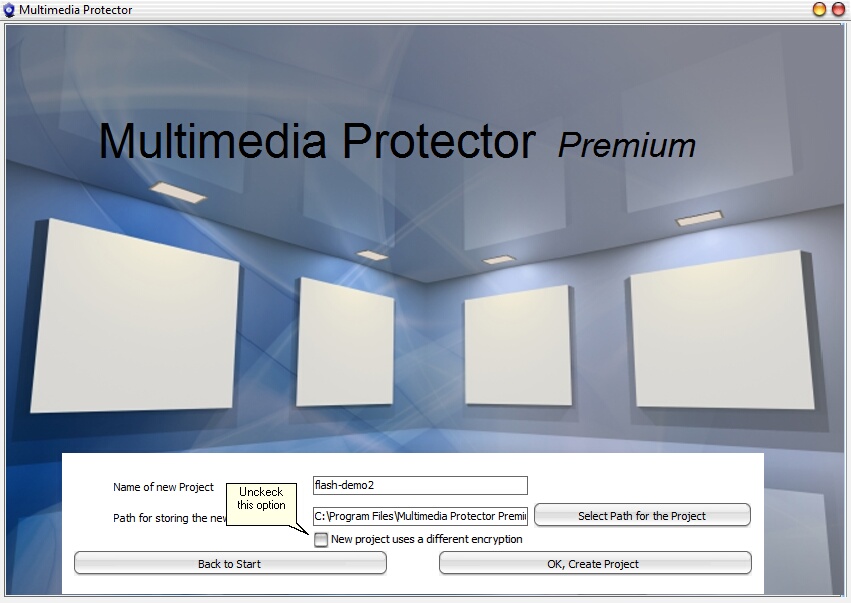 |
| Copy Options - use same encryption |
The important option is: New project uses a different encryption. Uncheck this option. This creates a new database which uses the same encryption and same Serial Numbers like the original database. You can have one license file and one Serial Number for all project files.
A good idea is, to use the main project name in the copy of the database.
Example
| • | Main project name: english-course |
| • | Copy project 1: english-course-lesson1 |
| • | Copy project 2: english-course-lesson2 |
Copy all databases in a new folder
Each project will create a deploy folder with the Multimedia Player, the license file (.lic) and the database (.mmf) - see chapter the Basics about Distributing a Project.
Create a new folder, e.g. ..\complete project. Copy all files from your main project and only the database (.mmf) file from the sub projects into this folder. The folder content would be as follows:
| • | autorun.ini |
| • | english-course.exe |
| • | english-course.lic |
| • | english-course.mmf |
| • | english-course-lesson1.mmf |
| • | english-course-lesson2.mmf |
Start files from other databases
Starting a file in another database depends on the type of the main application.
Menu
The best solution is to use a menu application, which allows to start Lesson 1, Lesson 2 separately. This menu would be outside the Multimedia Protector project. the See Menus.
The start command within the menu is:
| • | englisch-course.exe -f englisch-course-lesson1.mmf to start lesson1 |
| • | englisch-course.exe -f englisch-course-lesson2.mmf to start lesson2 |
Flash Menu
If the start application in the main project is a flash file (e.g. a menu), the flash file needs to use a special command.
http://FILE:english-course.exe -f english-course-lesson1.mmf$$RUN
This commands starts an exe file which is already available on the CD or hard disk. It can be used to start any external application. The file must be on the same folder like the Multimedia Player. A pathname cannot be used.
The parameter -f provides the database name to start.
Sample flash code: loadMovie("http://FILE:english-course.exe -f english-course-lesson1.mmf$$RUN",2);

