|
Use USB-Stick of the customer |


|

|

|

|
|
Use USB-Stick of the customer |
|
|
|
|
If a USB-Stick of the customer should be used, there is the same workflow with product activation. All activation options (online, e-mail, fax, phone) are supported. The user has to copy the original files to his own USB-Stick.
The USB-Stick protection uses the installation code 11. For activation by e-mail, fax, phone nothing specific has to be considered. See chapter: Unlock Key. If the installation code 11 is empty, then the USB-Stick does not support copy protection.
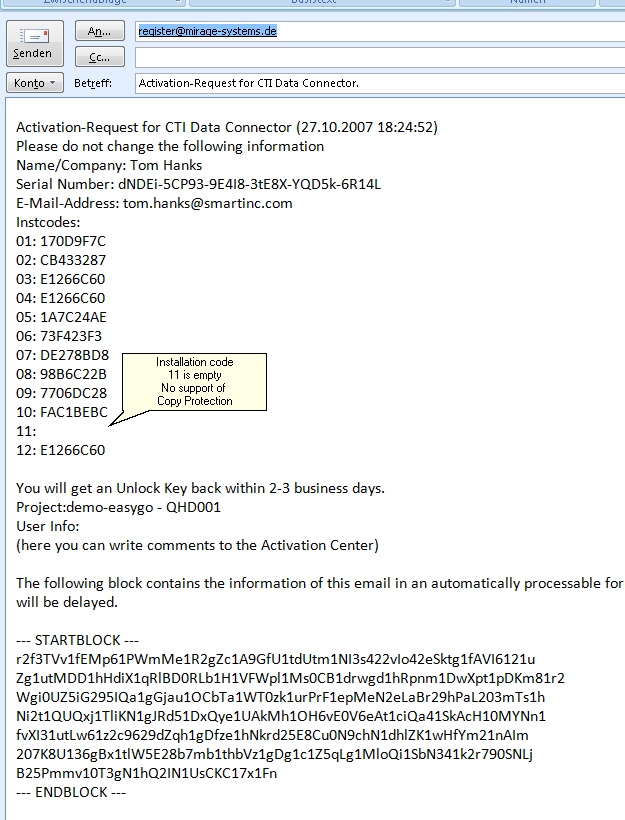 |
| E-Mail Activation - No support of USB stick protection |
For online activation, the activation server has to use installation code 11 as the main criteria. If the USB-Stick does not support copy protection, then the license is automatically bound to the PC which makes the activation.
Specify Code 11 as the Primary Hardware ID and code 4 as the Alternative Hardware ID. If you make any changes regarding the copy protection make sure, that you upload the files to the Activation Serveragain.

