Navigation: Part II - Enhanced Features > Block/Lock a licence after Activation is done >
Configuration Settings


|
Navigation: Part II - Enhanced Features > Block/Lock a licence after Activation is done > Configuration Settings |
|
Using the feature to transfer a licence requires special configuration settings in the licence file and for the Web Activation Server.
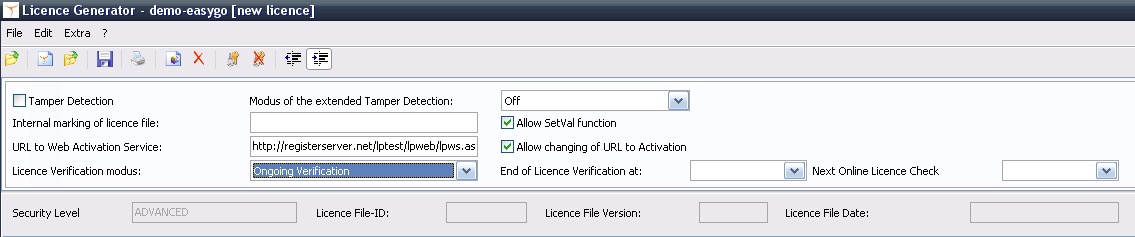
To use this feature the licence file needs special settings:
You can also configure these settings in your Project Template - see details , <LicenceVerification>, <EndVerification>,
|
The licprotectorws.config file on the Web Activation Server needs special settings:
<?xml version="1.0" encoding="utf-8" ?> <Configuration> <Project> <ProjectID>MoveLicenceDemoEasyGo</ProjectID>
<CheckActivationKeys>yes</CheckActivationKeys> <ActivationKeyRequired>no</ActivationKeyRequired> <NoOfAllowedKeyOccur>1</NoOfAllowedKeyOccur>
<CheckEntries>yes</CheckEntries> <EntryRequired>no</EntryRequired> <NoOfAllowedEntryOccur>1</NoOfAllowedEntryOccur>
<InstCodeType1>1</InstCodeType1>
<AllowReactivation>yes</AllowReactivation>
<MinIdenticalInstcodes>2</MinIdenticalInstcodes> <!-- Notice that CheckInstCodeType overrides MinIdenticalInstcodes --> <IgnoreLocalInstCodes>yes</IgnoreLocalInstCodes>
<CheckInstCodeType1>1</CheckInstCodeType1> <CheckInstCodeType2>3</CheckInstCodeType2>
<CheckLicenceDays>30</CheckLicenceDays>
<GeneratorPath>c:\inetpub\wwwroot\lpweb\alg</GeneratorPath> <GeneratorApp>autolicgenerator.exe</GeneratorApp> <GeneratorConfig>config-autogenerator.xml</GeneratorConfig> </Project> </Configuration>
|