Navigation: Important Activation Keys with EasyGo > Unlock Key >
Create Unlock Key using Web Activation Server


|
Navigation: Important Activation Keys with EasyGo > Unlock Key > Create Unlock Key using Web Activation Server |
|
Using the Web Activation Server to create the Unlock Key ensures, that the Serial Number can not be used twice (e.g. customers sends the Serial Number key by fax and uses the key on another PC with Online activation).
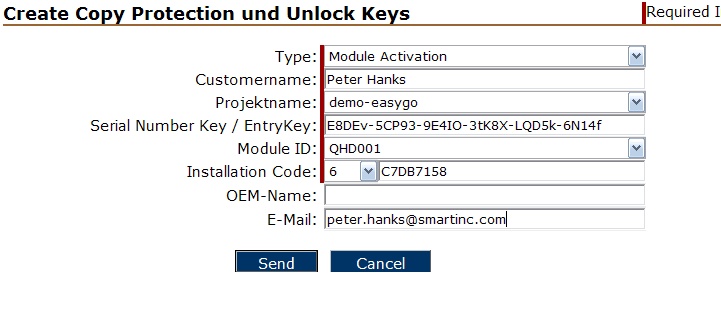
Log into the Web Administration Interface and select Tools, Manual Activation.
Select your project and the main module ID. Use the Serial Number and installation code from the e-mail, fax or phone. After pressing the button Send the data is stored and the Unlock Key is created.
Send the Unlock Key to the customer, which would use the key in the screen Enter Unlock Key.