Navigation: Part II - Enhanced Features > How TOs and FAQ >
How do I implement concurrent user testing?


|
Navigation: Part II - Enhanced Features > How TOs and FAQ > How do I implement concurrent user testing? |
|
Find below information about concurrent user testing.
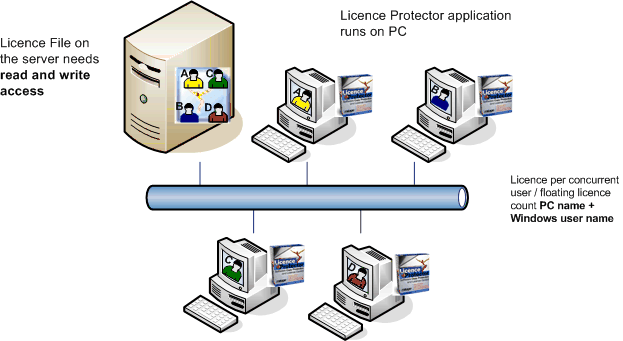
This concurrent user licence is also called floating licence. It is checked, how many users have started the application at the same time.
The licence per Concurrent User combines the PC name + Windows user name (e.g. OFFICEPC-TOM) and stores this name in the licence file. The combination is necessary to count a licence even if a user is logged in with the same name on multiple PCs.
Once the application is started, it checks if the name is already stored in the licence file and if not, it starts only if a free licence is available. After the application has been terminated, the licence is given back by removing the name in the licence file. The licence is available again for another user.
See also
|
What happens if an application crashes and no Quit could be performed? The slot of this user keeps locked and no other user can use the in fact free slot. To avoid that problem, Licence Protector uses a heartbeat algorithm to identify “dead” slots and frees them for other users. Every concurrent user sends a heartbeat (in fact an automatic validate) and at the same time checks if there are missing heartbeats of other users. So alive users remove dead ones.
Every module has a property CheckInterval which decides when heartbeats have to take place and are expected to take place. With that method it is assured that at maximum 2 times the CheckInterval dead users are freed.
For example: In a concurrent user module there is the CheckInterval set to 10 seconds then minimum after 10 and maximum after 20 seconds after his “death” the user is removed by other alive users who detect the problem by his missing heartbeat and so the licence will be available for another user after that delay.
Note that Licence Protector does not need to have an identical time base for all involved clients.
|
The functions ExistsEntry, IsEntryActivated, GetEntriesOfModule are also available for Concurrent User modules. Note that the usernames you receive or have to enter with these functions have to format:
Username+++Workstation
For example: You will receive alice+++stationhermes if alice uses a concurrent user licence from her computer named stationhermes.
Adding the workstation name ensures that if a user logs in with the same name on 2 machines that it is counted as 2 licences.
Warning: Do not use ActivateEntry or DeactivateEntry against a concurrent user module. The concurrent user mechanism could be disturbed by that calls. |
See also
Concurrent user with EasyGo
Concurrent user for modules
1 user concurrent user module
Remove Concurrent User
Special considerations
Page url: http://www.helpserver.biz/onlinehelp/lp/easygo/2.5/help2000/index.html?howto_concurrent_user.htm

 The licence file has to be on the server on a shared folder. Each application user needs a read/write access to the licence file.