Navigation: Part II - Enhanced Features > Network Licence - how it works >
Network Licence Per Concurrent User


|
Navigation: Part II - Enhanced Features > Network Licence - how it works > Network Licence Per Concurrent User |
|
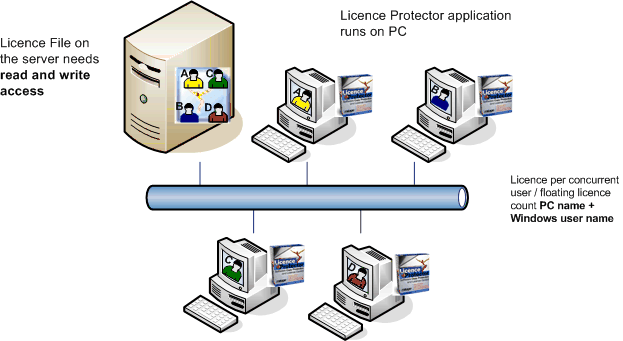
This concurrent user licence is also called floating licence. It is checked, how many users have started the application at the same time.
The licence per Concurrent User combines the PC name + Windows user name (e.g. OFFICEPC-TOM) and stores this name in the licence file. The combination is necessary to count a licence even if a user is logged in with the same name on multiple PCs.
Once the application is started, it checks if the name is already stored in the licence file and if not, it starts only if a free licence is available. After the application has been terminated, the licence is given back by removing the name in the licence file. The licence is available again for another user.
 The licence file has to be on the server on a shared folder. Each application user needs a read/write access to the licence file.
If a user connects through a remote connection using a tool like Remote Desktop, Citrix, Terminal Server or gotomypc, it depends on the tool if the remote connection counts as a separate license. For most tools, Licence Protector retrieves the PC name of the remote PC and counts the connection as a new license.
See also
How do I implement concurrent user testing?