Navigation: Part II - Enhanced Features > Transfer a licence from PC A to PC B > Transfer a licence using EasyGo >
Configuration Setttings


|
Navigation: Part II - Enhanced Features > Transfer a licence from PC A to PC B > Transfer a licence using EasyGo > Configuration Setttings |
|
Using the feature to transfer a licence requires special configuration settings in the licence file and for the Web Activation Server.
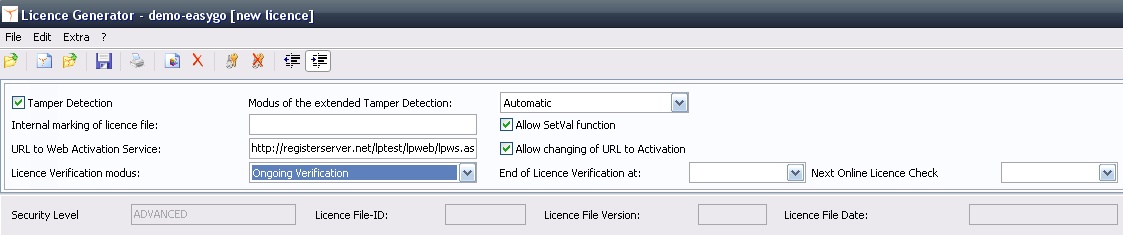
To use this feature the licence file needs special settings:
You can also configure these settings in your Project Template - see details <TamperDetection>, <TamperDetectionMode>, <LicenceVerification>, <EndVerification>, <AllowSetVal> |
The licprotectorws.config file on the Web Activation Server needs special settings:
<?xml version="1.0" encoding="utf-8" ?> <Configuration> <Project> <ProjectID>MoveLicenceDemoEasyGo</ProjectID>
<CheckActivationKeys>yes</CheckActivationKeys> <ActivationKeyRequired>no</ActivationKeyRequired> <NoOfAllowedKeyOccur>1</NoOfAllowedKeyOccur>
<CheckEntries>yes</CheckEntries> <EntryRequired>no</EntryRequired> <NoOfAllowedEntryOccur>1000</NoOfAllowedEntryOccur>
<InstCodeType1>1</InstCodeType1>
<AllowReactivation>yes</AllowReactivation>
<MinIdenticalInstcodes>2</MinIdenticalInstcodes> <!-- Notice that CheckInstCodeType overrides MinIdenticalInstcodes --> <IgnoreLocalInstCodes>yes</IgnoreLocalInstCodes>
<CheckInstCodeType1>1</CheckInstCodeType1> <CheckInstCodeType2>3</CheckInstCodeType2>
<CheckLicenceDays>3650</CheckLicenceDays>
<GeneratorPath>c:\inetpub\wwwroot\lpweb\alg</GeneratorPath> <GeneratorApp>autolicgenerator.exe</GeneratorApp> <GeneratorConfig>config-autogenerator.xml</GeneratorConfig> </Project> </Configuration>
The project configuration file (config-autogenerator.xml) file should have the default settings when using EasyGo.
|
||||

< <NoOfAllowedKeyOccour> defines how often an Activation Key (not the Serial Number) can be used. An Activation Key is normally used to modify a module (e.g. new licenses or new expiry date) after the initial product activation with the Serial Number has been done. Therefore the definition, that an Activation Key can only be used once has to be <NoOfAllowedKeyOccur>1</NoOfAllowedKeyOccur>
<NoOfAllowedEntryOccur> defines how often a module can be activated. EasyGo performs a module activation and uses the Serial Number Key as the unique ID to activate a module. As the licence is activated multiple times (each time a licence is transferred), a definition has to be made how often the licence transfer should be possible: <NoOfAllowedEntryOccur>1000</NoOfAllowedEntryOccur>
Details are explained in the chapter What is happening inside the licence?