Navigation: Implementing EasyGo > Project Template > Quick Start >
Node <Default>


|
Navigation: Implementing EasyGo > Project Template > Quick Start > Node <Default> |
|
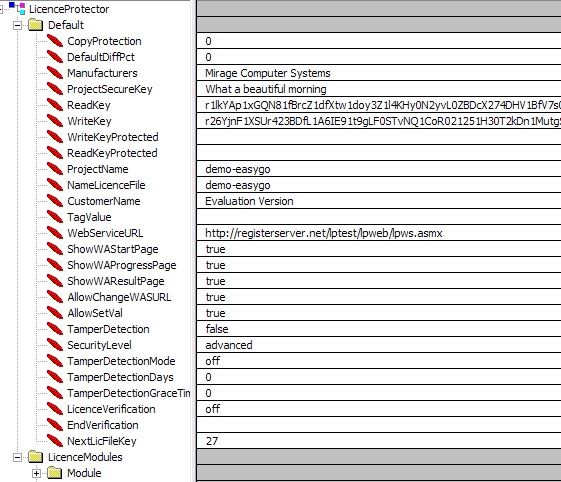
Open the project file and go to the node <Default>. Change the following settings. All other settings can be left on the default settings.
 |
| Node <Default> |
Manufactures
Type in your company name here. If you sell OEM licenses with different names see full description.
Personal Encrpytion
For testing purpose, do not change the ProjectSecureKey, ReadKey and WriteKey. After finalizing the test, replace it with your own Project Keys to get a personalized encryption.
ProjectName
Short name of your application. It should contain no spaces and is case sensitive. The project name is used to allow different workflows on the Web Activation Server. It is mandatory even if you use no Web Activation Server.
Can be used to store any ASCII value. Details see TagValue.
NameLicenceFile
Default name of the licence file. It should contain no spaces.
Link to the Web Activation Server. The default link goes to the Mirage test server. If you want to use the Web Activation Server, either replace it with the link to your own server or with the link you get if you are using the hosting service of Mirage.
Syntax: http://registerserver.net/lptest/lpweb/lpws.asmx
See also
Structure of the Template- complete command reference
Page url: http://www.helpserver.biz/onlinehelp/lp/easygo/2.5/help2000/index.html?pt_node_default.htm