Navigation: Implementing EasyGo > Project Template > Quick Start >
Node <Module>


|
Navigation: Implementing EasyGo > Project Template > Quick Start > Node <Module> |
|
Open the project file and delete the complete nodes with module ID D1001 and module ID QHD003 so that only module QHD001 is left.
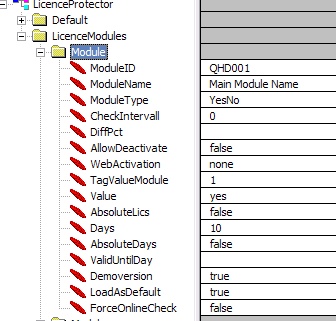 |
| Module definition QHD001 |
The ModuleID is the reference in the DLL call to address a module. It must be unique per project. The format of the ModuleID is up to 6 characters containing only capital letters A-Z and digits 0 to 9.
For EasyGo you need one main module, which is used for the activation of the product. This should be the module which is always included. Otherwise just make a module with the name of the application which is only used for activation.
ModuleName
Change ModuleName to the name of your application
All module types like licence per computer, user, concurrent user or Yes/No, counter, item counter is supported.
Change the module type for the main module to one of these settings:
U or 1 = Licence per user
S or 2 = Licence per Computer
C or 3 = Counter Module
Y or 4 = Yes/No Module
I or 5 = ITEM Counter
R or 6 = Concurrent user licence
Note: The Licence Protector Starter Edition allows only using a Yes/No module type.
 The maximum value of the User, Computer, Concurrent, Counter and ITEM Counter module is 2147483647. This value can only when a licence file is created. The maximum value you can set with an Activation Key is 23328.
Value
Change the value tag to:
| • | Yes - if the module is a Yes/No module |
| • | Number of licences for the evaluation version if the module is a licence per user, computer or concurrent user |
Time limitation (Days)
Define the number of days the version can be used without registration. During each program start the days left for evaluation are displayed.
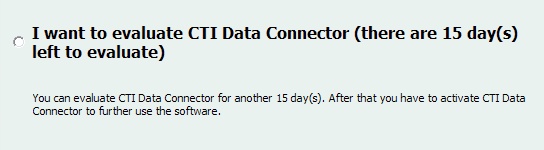
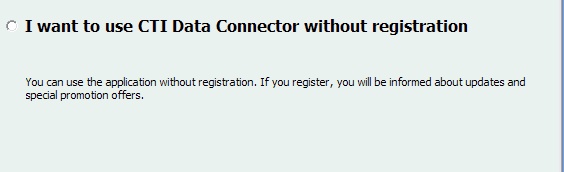
Setting days to 0 allows using the software without time limitation but offers an option for web registration. This makes sense to collect address information (note: to collect complete address information including newsletter information will be available at a later time).
If you set an Expiry Date (<ValidUntilDay>), which is before today’s date, then the version will expire instantly and can not be used without the Serial Number - See No evaluation version - Serial Number is mandatory
Demoversion
If you want to have a time limited demoversion, then set Demoversion to true. The limitations of the Demoversion have to be defined in your application.
WebActivation
The status must be set to none. The status is the trigger to allow activation and is set later to required with the Serial Number.
Can be used to store any ASCII value. Details see TagValue.
See also
Structure of the Template- complete command reference
Page url: http://www.helpserver.biz/onlinehelp/lp/easygo/2.5/help2000/index.html?pt_node_module.htm