Navigation: Important Activation Keys with EasyGo > Serial Number Key >
Create a key list with Serial Numbers


|
Navigation: Important Activation Keys with EasyGo > Serial Number Key > Create a key list with Serial Numbers |
|
A key list with hundreds of Serial Numbers can be generated in a batch process with the Automatic Licence Generator.

This is required if the application is sold via stores or with a box. It also simplifies the administration because per order just a key from the list can be used.
In the folder ..\EasyGo\key list you find sample configuration files. Basically, you have to define exactly the same settings like you would use with the manual generation of a Serial Number.
Copy your project template to the folder .\EasyGo\key list and modify the following files:
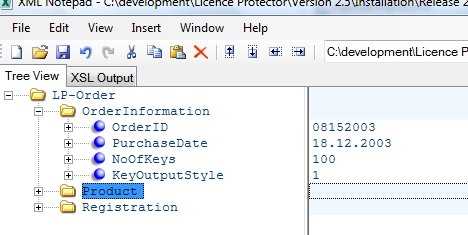
Myorderkey list.xml
Change NoOfkeys (=number of keys you want to generate) and use your module number as ProductID.
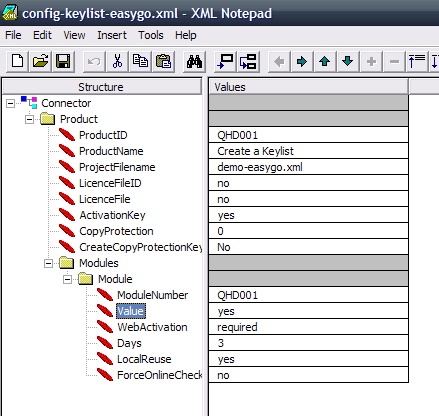
Config-key list-EasyGo.xml
This file includes the definition, with which options the Serial Number should be created. Use the same values like you would use within the Licence Generator and manual generation. You have to change in the sample file:
| • | ProductID |
| • | ProjectFilename |
| • | ModuleNumber |
| • | LocalReuse allows a reinstallation |
Start the process-key list.bat to create the key list.
Configuration file for a network license
To make a Serial Number for a network license or counter set value to the number of network licenses you want to allow and AbsoluteLics to Yes. This replaces the existing value in the licence file and does not add the licenses. Find a sample in the file config-key list-easygo-network.xml.
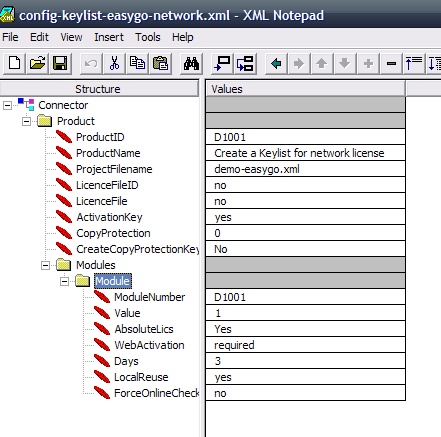
 Never define ForceOnlineCheck=Yes for a Serial Number Key. The online validation is automatically done if the user selects Online Activation during the activation process.
Page url: http://www.helpserver.biz/onlinehelp/lp/easygo/2.5/help2000/index.html?serial_number_in_batch_.htm