Navigation: Part II - Enhanced Features > Time limited Full Version >
Different time limitation for each installation


|
Navigation: Part II - Enhanced Features > Time limited Full Version > Different time limitation for each installation |
|
This workflow is recommended because it is more flexible. It allows to
| • | Define a different expiry date for each user |
| • | Enable reinstallation on the same machine |
| • | Enable transferring a licence from PC A to PC B |
The usage of the software is controlled with an additional module.
When the customer buys the product you deliver 2 keys
| • | Serial Number Key and |
| • | Activation Key for the module Software Usage which defines the desired expiry date |
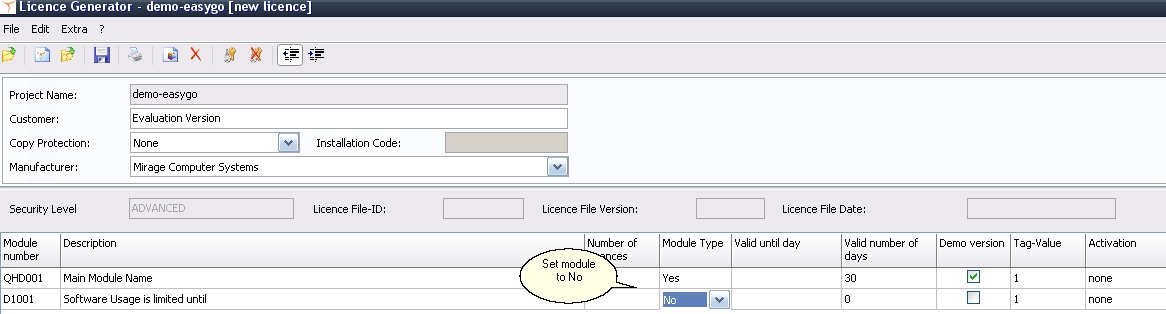
Modify the Project Template and add a new module with type Yes/No (module type = 4). This module is only used when the product is activated. The time limitation of the evaluation version is done via the default workflow with EasyGo. Set the default value for this module to No.
|
Use the main module for testing with EasyGo - see PrepareAndCheck. As long as the application is not activated (Activation status is <> Done of the main module), the additional module is not tested. Retrieve the activation status with the command GetWebActivation.
After the product is activated (GetWebActivation = 2), check the additional module Software Usage
|
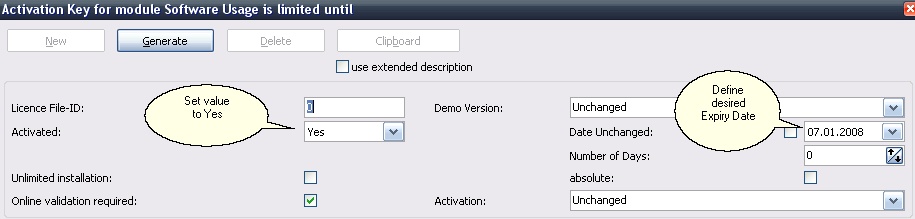
This Activation Key for the module Software Usage defines the desired expiry date . If you are using the Web Activation Server then additionally check Online Validation required
|
If an activation by E-Mail, Fax or Phone is used, the additional Activation Key can be typed in after the Unlock Key was applied. If Online Activation is used you need an own screen to type in the key (see application logic).