Navigation: Implementing EasyGo >
Licence Viewer


|
Navigation: Implementing EasyGo > Licence Viewer |
|
The Licence Viewer is the built in administration interface for the end user. To invoke the Licence Viewer see ShowLicViewer or for EasyGo see SetRegisterSettings (LicViewerAllowed) After the registration process, the EasyGo screens appear only in error mode.
You should provide the Licence Viewer (e.g. menu help, show License Information) to allow typing in Activation Keys or displaying licence information.
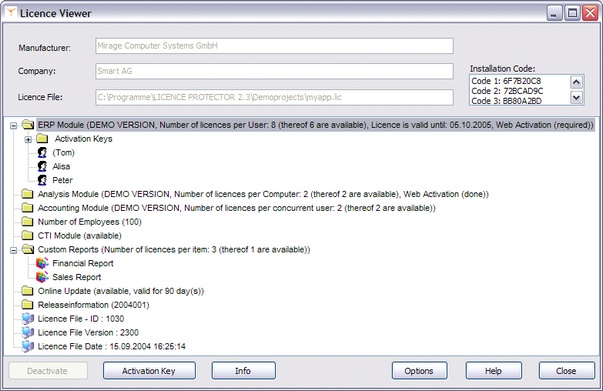
 We strongly recommend implementing the Licence Viewer
It displays:
| • | Manufacturer. The company name defined in the project template with <manufacturers> |
| • | Company: Before applying the Serial Number the Default Customer Name. After that, the customer name entered during the activation (Online, E-Mail, Fax, Phone) |
| • | The product name defined in project template with <Modulename> |
| • | The licence type (per user / PC / concurrent). Also the name of the users or the PC name using a licence |
| • | The remaining time for evaluation(expiry date) |
| • | The installation codes (hardware IDs) |
The user can:
| • | Deactivate a licence by selecting the user name or PC name if the licence is not longer needed - see also error message No free licence available |
| • | Enter an Activation Key which was generated within the Licence Generator or Automatic Generator, e.g. to change the time limitation or number of users / PCs |
| • | Activate a log file with the Options button in case Mirage Support needs to trace an error |
If you enable the help button you have to distribute the help files.
Page url: http://www.helpserver.biz/onlinehelp/lp/easygo/2.5/help2000/index.html?licence_viewer.htm