Navigation:  Implementing EasyGo > Function Reference EasyGo >

Define alternative text for activation screen

Previous pageReturn to chapter overviewNext page


Allows defining an alternative text on the left side (white area) of the activation screen.


If you use this command you have to provide the text in each language you want to use.
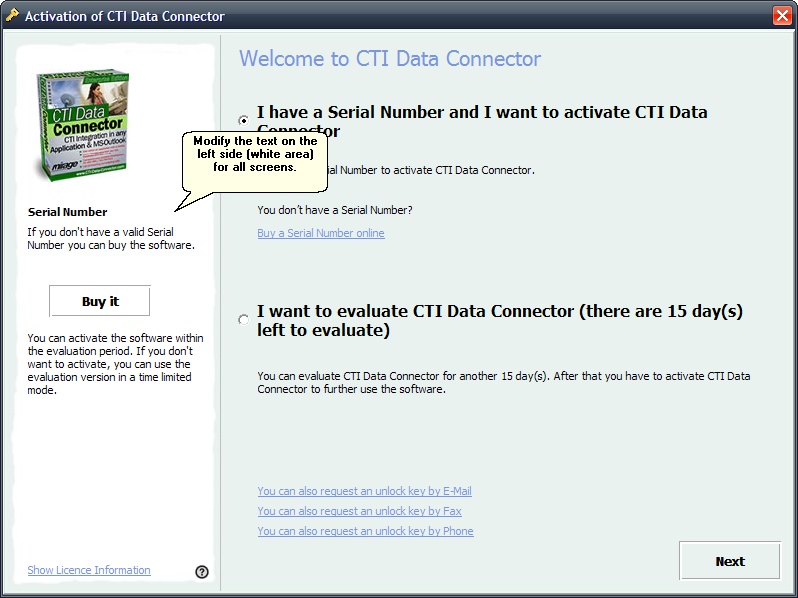
 

Modify text for activation screen


Name

SetRegisterHelp                                                                                    


Purpose

Set help texts for the left side of the EasyGo form.

Params

Parameter

Type

Example

Note

HelpWelcome

String


Help text that is displayed on the left side of the EasyGo form on the first page that welcomes the user.

If empty then the default text is used.

HelpExpired

String


Help text that is displayed on the left side of the EasyGo form on the page that is displayed if the licence of the main module has expired.

If empty then the default text is used.

HelpActivation1

String


Help text that is displayed on the left side of the EasyGo form on the Activation page that handles the Serial Number input for all registration methods (Online, E-Mail, Fax, Phone).

This is the part above the Buy-Button.

If empty then the default text is used.

HelpActivation2

String


Help text that is displayed on the left side of the EasyGo form on the Activation page that handles the Serial Number input for all registration methodsOnline, E-Mail, Fax, Phone).

This is the part below the Buy-Button.

If empty then the default text is used.

HelpUnlock

String


Help text that is displayed on the left side of the EasyGo form on the Unlock page that handles the Unlock Key input for the manual registration methods (E-Mail, Fax, phone).

If empty then the default text is used.

HelpDone

String


Help text that is displayed on the left side of the EasyGo form on the page that tells the user that the Activation has succeeded.

If empty then the default text is used.

HelpErrorMsg

String


Help text that is displayed on the left side of the EasyGo form on the Error-Message page.

If empty then the default text is used.

Returncode

Returncode

Type Integer

Note

0

Settings are successful

Other value

Error occurred, see list of return codes

Usage

To customize the EasyGo form. This call only is necessary if further explanation of the process has to be displayed for the user.

Sample


lic.SetRegisterHelp('', // Welcome

                   '', // Expired

                   '', // Activation1 (above Buy-Button)

                   '', // Activation2 (below Buy-Button)

                   '', // Unlock

                   '', // Successful

                   '') // Error-Message


...                                          

See also

EasyGo, SetRegisterSettings, PrepareAndCheck


Help Text


Page url: http://www.helpserver.biz/onlinehelp/lp/easygo/2.5/help2000/index.html?eg_define_alternative_help_text.htm